ComfyUI 쓰다 보면
노드 하나 설치하려고 GitHub 들어가서 복사 붙여넣기 반복하게 된다.
이때 꼭 필요한 게 ComfyUI Manager
노드 설치, 업데이트, 삭제까지
전부 한 화면에서 관리 가능해서 사실상 필수 플러그인
1) ComfyUI Manager ?
- ComfyUI용 플러그인 관리자
- 노드 검색 / 설치 / 업데이트 가능
- ControlNet, 커스텀 노드 관리가 쉬워짐
- 일일이 GitHub 안 들어가도 됨
2) 설치 전 확인 사항
- ComfyUI가 이미 설치되어 있어야 함
- GitHub에서 파일 내려받을 수 있는 환경
https://github.com/Comfy-Org/ComfyUI-Manager/tree/manager-v4
GitHub - Comfy-Org/ComfyUI-Manager: ComfyUI-Manager is an extension designed to enhance the usability of ComfyUI. It offers mana
ComfyUI-Manager is an extension designed to enhance the usability of ComfyUI. It offers management functions to install, remove, disable, and enable various custom nodes of ComfyUI. Furthermore, th...
github.com
3) 설치 방법

cmd 에서 주소를 통해 설치 or 다운로드 zip 다운 받아서 수동 설치
선택해서 가능


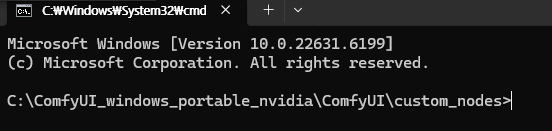
해당 경로에서 cmd 입력하면
해당 경로 위치에서 cmd가 열린다.

노란색 부분 '복사 아이콘' 눌러서 복사

cmd에 붙여넣고, 엔터

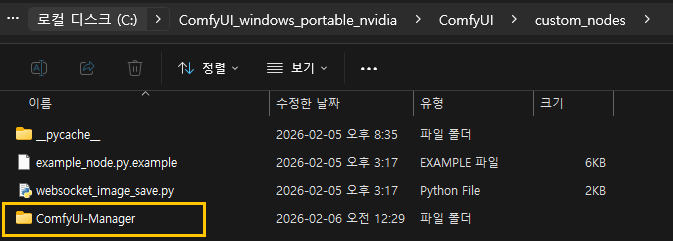
설치가 끝나면, custom_nodes에
ComfyUI-Manager 폴더 생성
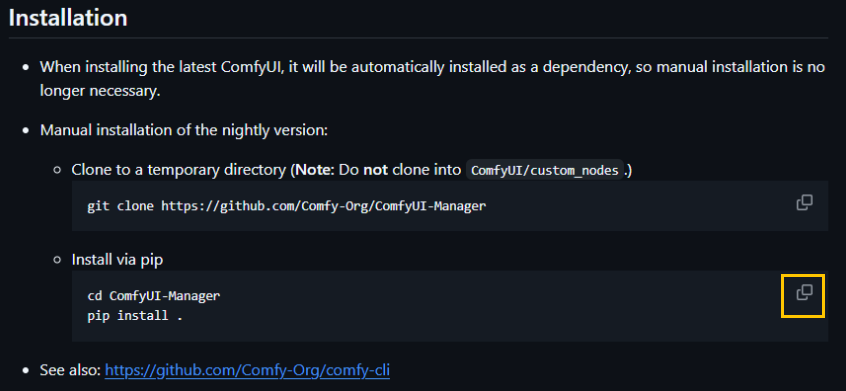
복사하기 한 뒤 그대로 붙여넣기 해도 되고,
순차적으로
1) cd ComfyUI-Manager 입력 ComfyUi-Manager 이동
2) pip install . 입력


설치 완료.
4) 확인

ComfyUI 실행

상단 오른쪽에
Manager 버튼 확인 가능.

'디지털 > ComfyUI' 카테고리의 다른 글
| [ComfyUi] Conditioning Concat (Text) (0) | 2026.02.11 |
|---|---|
| [ComfyUi] 77 Tokens = 1 Chunk: 프롬프트 길이 제한 이해하기 (0) | 2026.02.11 |
| [Comfy UI] 설치 가이드 ComfyUI Portable (0) | 2026.02.06 |
| [Comfy UI] 설치 가이드 ComfyUI Desktop (0) | 2026.02.05 |
| [ComfyUi] ComfyUI와 WebUI 'Model 폴더' 공용 사용하기 (0) | 2026.02.05 |